Bemmoly: the open-source, self-hosted alternative to Confluence
A wiki for your whole company on a server you own: spaces and page trees, a live editor, comments that follow their words and the full history of every page. Bemmoly is MIT licensed, free for any number of people, and Import from Confluence brings your spaces across.
Open. Free. Nothing to buy.
What you install is the whole product, and it stays that way.
100% open source
MIT licensed. Every feature is in the public repository: no open core, no enterprise edition, no private modules.
No subscription
No subscription, plans, tiers, seat limits or trial clock. Free forever, with nothing to upgrade to. Your only bill is the server.
No in-app purchases
No paywalled features, no upsell banners, no “contact sales”. Every switch in Settings is yours to flip.
What you get today
Everything below is in Bemmoly 1.0.0, the release the installer pulls today. The Docs module is in every install, works with or without Work, and stays off until an admin turns it on.
Spaces and page trees
Drag pages above, below or into one another, star them, and restore from each space’s trash. Space admins choose who is in.
Writing together, live
Several people on one page see each other’s named cursors and never overwrite each other; offline edits merge on return.
Blocks for real documents
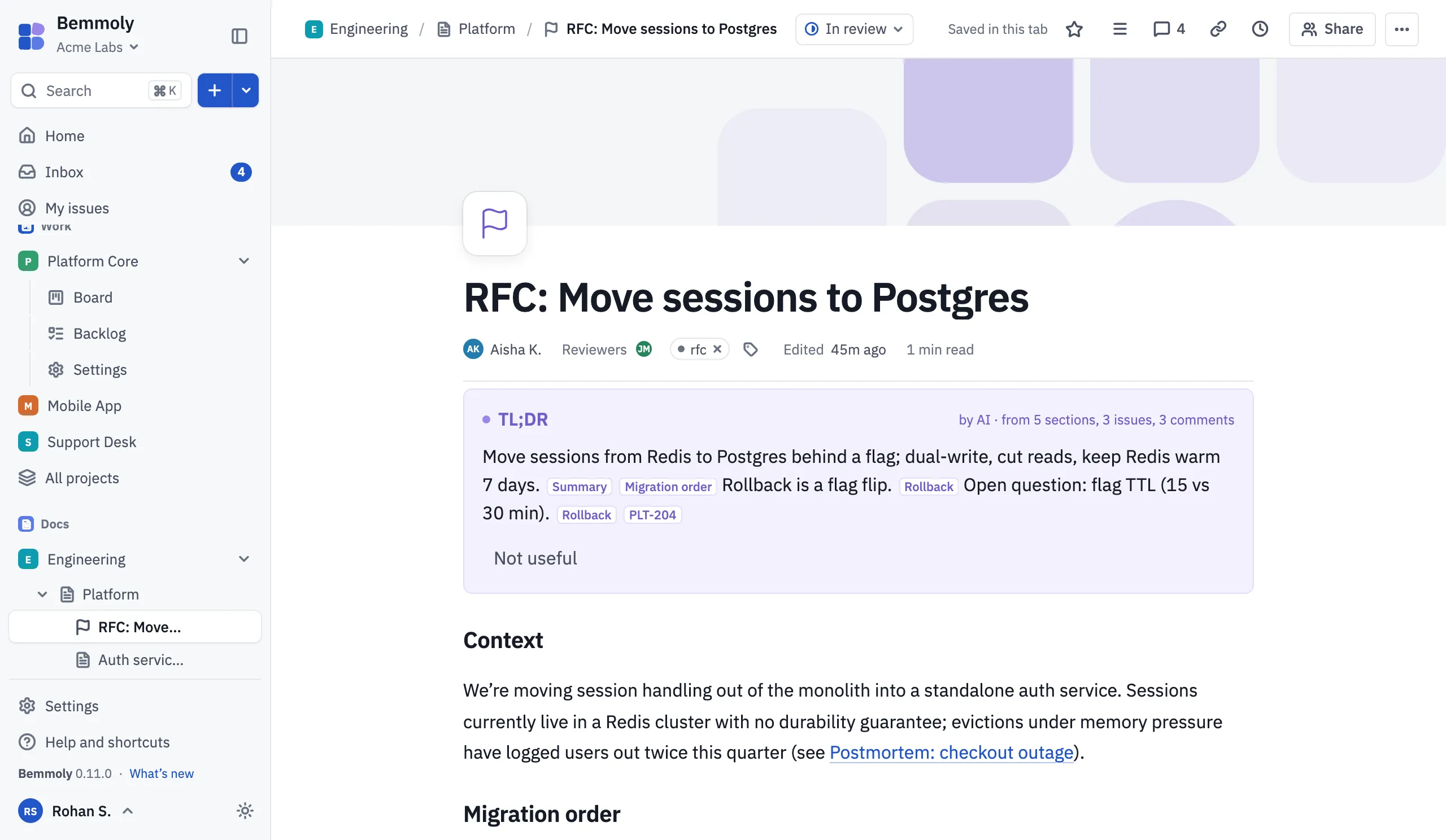
Type “/” for headings, callouts, decisions, tables, images, code coloured by language and a table of contents.
Comments that stay put
Comment on a page or on selected words; threads have replies and mentions, and follow their words through later edits.
Version history
Compare any two versions block by block and word by word, and restore one as a live edit that is itself kept.
Reviews and templates
Ask for review and publish from the page’s status, and start from six templates: RFC, meeting notes, postmortem, spec, runbook and decision log.
Issues inside the page
With Work turned on, issue chips and tables from a saved filter show each issue’s live status.
Export any time
A page as Markdown or HTML, a page and its subpages as a zip, or PDF through your browser.
Ask your docs
Off until an admin turns it on: answers with numbered citations from pages you can open, and a TL;DR on each page.
Bemmoly and Confluence, side by side
Both keep a company’s pages in spaces. The difference is where it runs, who holds the data and what it costs. Each cell links to the page that says so.
| Topic | Bemmoly | Confluence (Atlassian cloud) |
|---|---|---|
| Where it runs | Bemmoly Your own server: a Linux VM in your cloud account or a machine in your rack. Source: Self-hosting | Confluence (Atlassian cloud) Atlassian’s cloud, which runs in AWS regions. Source: Atlassian: Understand data residency |
| Licence | Bemmoly MIT, open source. Every feature is in the public repository. Source: LICENSE | Confluence (Atlassian cloud) Proprietary, used under the Atlassian Customer Agreement. Source: Atlassian Customer Agreement |
| Pricing model | Bemmoly None. No subscription, plans, tiers or seat limits; you pay only for your server. Source: Settings › Members | Confluence (Atlassian cloud) Subscription plans, free and paid. Source: Atlassian: Confluence pricing |
| Where your data lives | Bemmoly In your Postgres and your server’s folders, or an S3-compatible bucket you choose for files and backups. Source: On-premise | Confluence (Atlassian cloud) Atlassian’s Global location by default; a chosen location on Standard, Premium and Enterprise plans. Source: Atlassian: Understand data residency |
| Bringing work across | Bemmoly Import from Confluence (Cloud and Data Center) or a space export: page trees, comments, labels and attachments, with a preview first. Source: Release notes | Confluence (Atlassian cloud) The source of the import. |
On hosting choices, from Atlassian’s own announcements:
- Support for its Server products ended on February 15, 2024. Source
- Its Data Center products reach end of life in 2029, with Bitbucket and Bamboo as exceptions. Source
Bemmoly is built to run on your own server from the first release.
Moving your spaces across
-
Install Bemmoly and turn on Docs
One command on a Linux VM, then Settings › Manage modules. The setup wizard offers the import as one of its steps, too.
-
Connect your site
In Settings › Import, choose Import from Confluence, then enter the site address (Cloud or Data Center) and an API token or personal access token. The token is stored encrypted and never shown again.
-
See what will come across
Before anything is written you see the spaces the site holds and their counts, so you choose what to bring.
-
Run it and read the report
Spaces and their page trees arrive with labels, threaded comments and attachments. Links are rewritten to the imported pages and issues, and macros Bemmoly has no block for are kept as labelled blocks rather than dropped.
-
Run it again whenever you like
Every imported record is remembered, so a second run updates what the first one made instead of copying it, and leaves alone anything edited in Bemmoly since.
Notes kept as Markdown come in too: drop a folder into a space and its folders become parent pages.
Questions
- Is Bemmoly a self-hosted wiki?
- Yes. The Docs module is a wiki for your whole company that runs on your own server: spaces, page trees, a live collaborative editor, comments, version history and templates, stored in your own Postgres.
- Is Bemmoly really free?
- Yes. Bemmoly is open source under the MIT license, with no subscription, no seat limits and no in-app purchases. Every feature is in the image you install; your only cost is the server it runs on.
- Can I bring my spaces over from Confluence?
- Yes. Import from Confluence brings spaces and their page trees from Cloud or Data Center, with labels, threaded comments and attachments, and images show inline in the imported pages. If you have a space export instead, import its HTML pages from inside a space.
- What happens to macros?
- Macros with a matching block become that block. Any other macro is kept as a labelled block where it stood, so nothing is silently lost and you can see what to tidy up.
- Can I get my pages out again?
- Yes. Export a page as Markdown or self-contained HTML, a page and its subpages as a zip, or print it to PDF from your browser.
- Is Bemmoly affiliated with Atlassian?
- No. Bemmoly is an independent open source project. Confluence is named here only to compare the two and to describe the import.
Run your company wiki on your own server
On a fresh Linux VM with a domain pointing at it, one command installs Docker, Postgres, automatic HTTPS, nightly backups and the updater, then prints the address to open.
curl -fsSL https://get.bemmoly.com | sh